 |
|
You are here: GSI Wiki>TOS/Timing Web>TimingSystemDocumentation>TimingSystemHowTo>TimingSystemHowSyncMon (2025-07-07, DietrichBeck)
How-To: Sync Mon Tool
Introduction
This is How-To about the sync-mon tool. This allows very basic monitoring of synchronization between machines. A list with relevant Frontends/SCUs can be found here.Monitoring
A simple monitoring app is available via Launcher -> Entwicklung -> 'sync-monitor'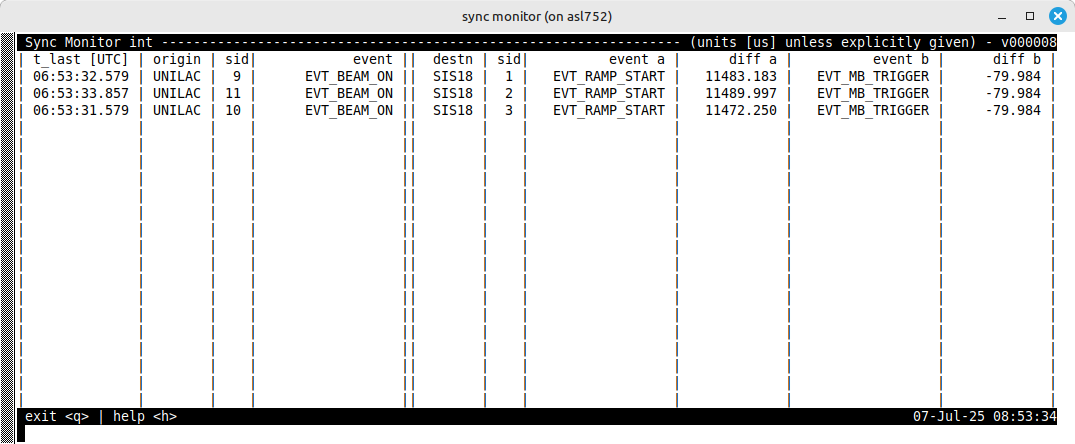 Figure: Screenshot of the sync-mon monitor. Left: Extraction machine. Right: Injection machine. See text for details.
The figure above shows an example of the sync-mon monitor. The event names are hard coded and can not be changed by the user. A transfer will only be properly displayed after it has been executed at least once. In case of UNILAC beam injected into SIS18, the information of 'event a' might be missing in case of special injection modes like 'multi'.
Figure: Screenshot of the sync-mon monitor. Left: Extraction machine. Right: Injection machine. See text for details.
The figure above shows an example of the sync-mon monitor. The event names are hard coded and can not be changed by the user. A transfer will only be properly displayed after it has been executed at least once. In case of UNILAC beam injected into SIS18, the information of 'event a' might be missing in case of special injection modes like 'multi'.
Display
sync-mon- t_last: time of last synchronization as UTC
- origin: 'extraction' machine
- sid: sequence ID of 'extraction beam process'
- event: event name; indicating beam extraction
- destn: 'injection' machine
- sid: sequence ID of 'injection beam process'
- event a: event name; indicating 'main thread' of a ring machine
- diff a: deadlineevent a - deadlineevent
- event b: event name; indicating 'injection thread' of a ring machine
- diff a: deadlineevent b - deadlineevent
User Control
- h: display help text; basically, the URL of this wiki page is displayed
- q: quits the monitor application
Client and Server
The server must run on a node with access to the relevant timing network. The client may run everywhere on any node on the ACC netowrk.Server
[ruth@scuxl4711 ~]# sync-serv-mon -h
Usage: sync-serv-mon <device name> [OPTIONS] <server name prefix>

  -h                   display this help and exit
  -e                   display version
  -f                   use the first attached device (and ignore <device name>)
  -d                   start server publishing data

  The paremter -s is mandatory
  -s <what>            specifies what will be monitored; this can be
                       0: UNILAC Transfer Channel (reference group)
                       1: SIS18 injection (injection and main threads)
                       2: SIS18 extraction
                       3: ESR injection
                       4: ESR extraction
                       5: CRYRING injection

This tool monitors the transfer between machines at GSI and FAIR.

Example1: 'sync-serv-mon tr0 -s0 -d pro'

Report bugs to <d.beck@gsi.de> !!!
Version 000008. Licensed under the GPL v3.
Client
[root@scuxl4712 ~]# sync-mon -h
Usage: sync-mon [OPTION] <name>

  -h                  display this help and exit
  -e                  display version

Use this tool to display information on transfers
Example1: 'sync-mon pro'

Report software bugs to <d.beck@gsi.de>
Version      5. Licensed under the LPL v3.
Communication
Server and client communicate via dim. Remember to set the environment variableDIM_DNS_NODE=asl105.
Code, Build, Deployment
Code is here:bel_projects/tree/.../modules/sync-mon
For branch and hash of the current version check the logbook
For building and deployment check the comments given at the top of the 'Makefile'
Example for building and deployment for PRO (assuming target system runs ACC7 ramdisk)
make clean                                                                     // clean
make make MASP=NO ENV=pro SYSENV=ACC7 PREFIX= all                              // build software and generate nfs-init scripts
make PREFIX= SYSENV=ACC7 STAGING=/common/export/timing-rte/sync-mon deploy     // copy stuff to location where nfs-init will find it
-- DietrichBeck - 2025-07-07


| I | Attachment | Action | Size | Date | Who | Comment |
|---|---|---|---|---|---|---|
 png png |
sync-mon.png | manage | 39 K | 2025-07-07 - 08:54 | DietrichBeck | sync monitor |
Please login to edit this topic
Topic revision: r1 - 2025-07-07, DietrichBeck


 AcceleratorControls
 Copyright © by the contributing authors. All material on this collaboration platform is the property of the contributing authors.
 Ideas, requests, problems regarding GSI Wiki? Send feedback | Legal notice | Privacy Policy (german)