 |
|
You are here: GSI Wiki>BEPHY Web>PythonBridge (2025-06-17, PennyMadysa)
-- SabrinaAppel - 2023-10-02
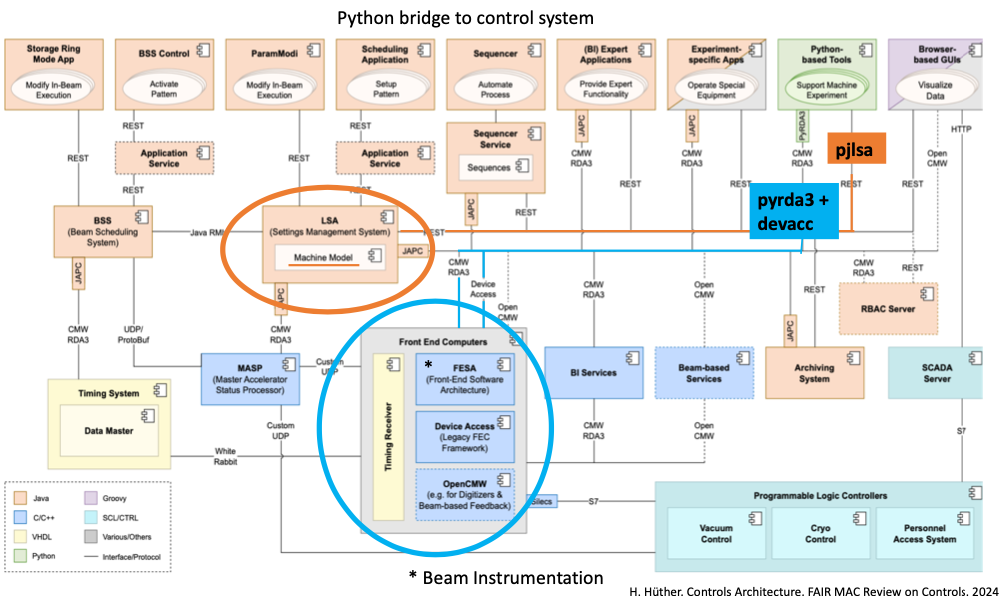 At GSI, the LSA (LHC Software Architecture) is the Settings Management System used as the central system for managing accelerator settings. Originally developed at CERN, LSA was adapted for use at GSI and FAIR to enable consistent and reproducible configuration of accelerator devices. It handles all machine settings in a structured, version-controlled environment and supports high-level beam-based adjustments known as trims.
A trim modifies beam properties by adjusting the relevant machine settings in a consistent and coordinated way. Instead of setting individual hardware parameters manually, trims allow high-level physical properties (e.g., beam energy, orbit, or tune) to be changed. The underlying system automatically calculates and applies the required changes to all affected devices.
ACO hosts three separate LSA databases:
At GSI, the LSA (LHC Software Architecture) is the Settings Management System used as the central system for managing accelerator settings. Originally developed at CERN, LSA was adapted for use at GSI and FAIR to enable consistent and reproducible configuration of accelerator devices. It handles all machine settings in a structured, version-controlled environment and supports high-level beam-based adjustments known as trims.
A trim modifies beam properties by adjusting the relevant machine settings in a consistent and coordinated way. Instead of setting individual hardware parameters manually, trims allow high-level physical properties (e.g., beam energy, orbit, or tune) to be changed. The underlying system automatically calculates and applies the required changes to all affected devices.
ACO hosts three separate LSA databases:
You can access the three different LSA environments (PRO, INT, DEV) by selecting the corresponding Python packages:
Python Access to the GSI Control System (Python Bridge)
- Python Access to the GSI Control System (Python Bridge)
- Various GSI FAQs
- Version Mismatch Between Server and Client
- Create a Client object on which to make Get, Set and Subscribe requests
- Get current from the Slow and Fast SIS18 trafos
- Change sample time for Fast SIS18 transformers
- Get closed orbit and trajectory from the Beam Position Monitors (BPM)
- How to find information about the FESA filters?
- FESA REST Interface
- Timing Selectors, Users, Sequences, Beam Processes, Beam Production Chains, Timing Group IDs
- The Request and Builder Patterns
- Setting Up Pjlsa on Arch Linux
At GSI, the LSA (LHC Software Architecture) is the Settings Management System used as the central system for managing accelerator settings. Originally developed at CERN, LSA was adapted for use at GSI and FAIR to enable consistent and reproducible configuration of accelerator devices. It handles all machine settings in a structured, version-controlled environment and supports high-level beam-based adjustments known as trims.
A trim modifies beam properties by adjusting the relevant machine settings in a consistent and coordinated way. Instead of setting individual hardware parameters manually, trims allow high-level physical properties (e.g., beam energy, orbit, or tune) to be changed. The underlying system automatically calculates and applies the required changes to all affected devices.
ACO hosts three separate LSA databases: -
PRO (Production – used on the accelerator),
-
INT (Integration – for testing the environment),
-
DEV (Development – for quick tests).
You can access the three different LSA environments (PRO, INT, DEV) by selecting the corresponding Python packages:
pjlsa_gsipro, pjlsa_gsiint, and pjlsa_gsidev.
Example, which print a list of all patterns currently loaded into the accelerators at GSI:
from pjlsa_gsipro import LSAClientGSI
lsa = LSAClientGSI ()
with lsa.java_api():
   from cern.lsa.client import ContextService, ServiceLocator
cs = ServiceLocator.getService(ContextService)
patterns = list(cs.findResidentPatterns())
for pattern in patterns:
    print(pattern)
pyda : A façade package that provides a uniform interface to talk to FESA devices, used to read data from beam diagnostic devices and other hardware.
Example how data can be received from a device (Note that you might have to change the device name to that of one that's currently running):
import pyda.metadata, pyda_rda3, numpy as np

rda3 = pyda_rda3.RdaProvider()
client = pyda.SimpleClient(
    provider=pyda.providers.Provider(
        data_source=pyda_rda3.RdaProvider(),
        metadata_source=pyda.metadata.NoMetadataSource(),
    ),
)

s = client.subscribe("YRT1DC3/Acquisition", context="FAIR.SELECTOR.ALL")
for a in s:
    print(a.value.header.selector)
You can break out of the loop with Ctrl-C.
devacc: Python interface to the legacy Device Access control system. (Examples can be find following the link)
These tools enable flexible and scriptable interaction with GSI’s accelerator infrastructure, making it easier to automate workflows and analyze data.
See PythonPackaging for a quick-start guide how to install the necesssary packages.
Various GSI FAQs
Version Mismatch Between Server and Client
ACO hosts three separate LSA databases: PRO (production, used on the acceleration) INT (integration, used for integration tests of the environment), DEV (development, used for quick tests). You can access each of these servers by picking your PJLSA client from one of thepjlsa_gsipro, pjlsa_gsiint and pjlsa_gsidev Python packages respectively.
Unfortunately, PRO runs on a different LSA version (18.2.1) than the other two (19.0.0-RC-INT-SNAPSHOT). The package that manages Java libraries for us, cmmnbuild_dep_manager, can only install one version of any package. This means that you cannot install pjlsa_gsipro and either of the other two packages. If you try, cmmnbuild_dep_manager will simply install the later of the two LSA Java packages. This means that you will still be able to connect to DEV and INT, but trying to connect to PRO will fail with a Java exception complaining about a version mismatch between server and client.
The best way around this is to create two different virtual environments and install each of these packages into a separate venv:
python -m venv --system-site-packages ~/vens/lsa-pro/
source ~/venvs/lsa-pro/bin/activate
pip install pjlsa_gsipro
deactivate
python -m venv --system-site-packages ~/vens/lsa-int/
source ~/venvs/lsa-int/bin/activate
pip install pjlsa_gsiint
deactivate
You can then switch between venvs by simply activating the other one (no
deactivate necessary.) You may also use this script to switch between venvs in a more convenient way.
Create a Client object on which to make Get, Set and Subscribe requests
import pyda
import pyda_rda3
client = pyda.SimpleClient(provider=pyda_rda3.RdaProvider())
Get current from the Slow and Fast SIS18 trafos
FESA Modell:ACCT_DU.sddsc057
subscription = client.subscribe(
    #"GS09DT_ML/Acquisition",
    "GS09DT_S/Acquisition",
    context=[
        TimingSelector("FAIR.SELECTOR.ALL"),
        DataFilter(requestPartialData=True) #'DT_S
    ],
)
A example script can be found https://git.gsi.de/scripting-tools/cmw-lsa-wiki/-/snippets/101
Change sample time for Fast SIS18 transformers
Device:GS01DT1FP, FESA class: FCT_Ring_DU.sddsc079
response = client.set("GS01DT1FP/Setting", value={"sampleTime": numpy.double(0.1)}, context="FAIR.SELECTOR.P=75")
# Check whether the call succeeded:
assert response.exception is None
# Check if the value is set now:
response = client.get("GS01DT1FP/Setting", context="FAIR.SELECTOR.P=75")
print(response.value["sampleTime"])
Get closed orbit and trajectory from the Beam Position Monitors (BPM)
FESA model:HadronCircular_DU_SIS18.sddsc058
Trajectory:
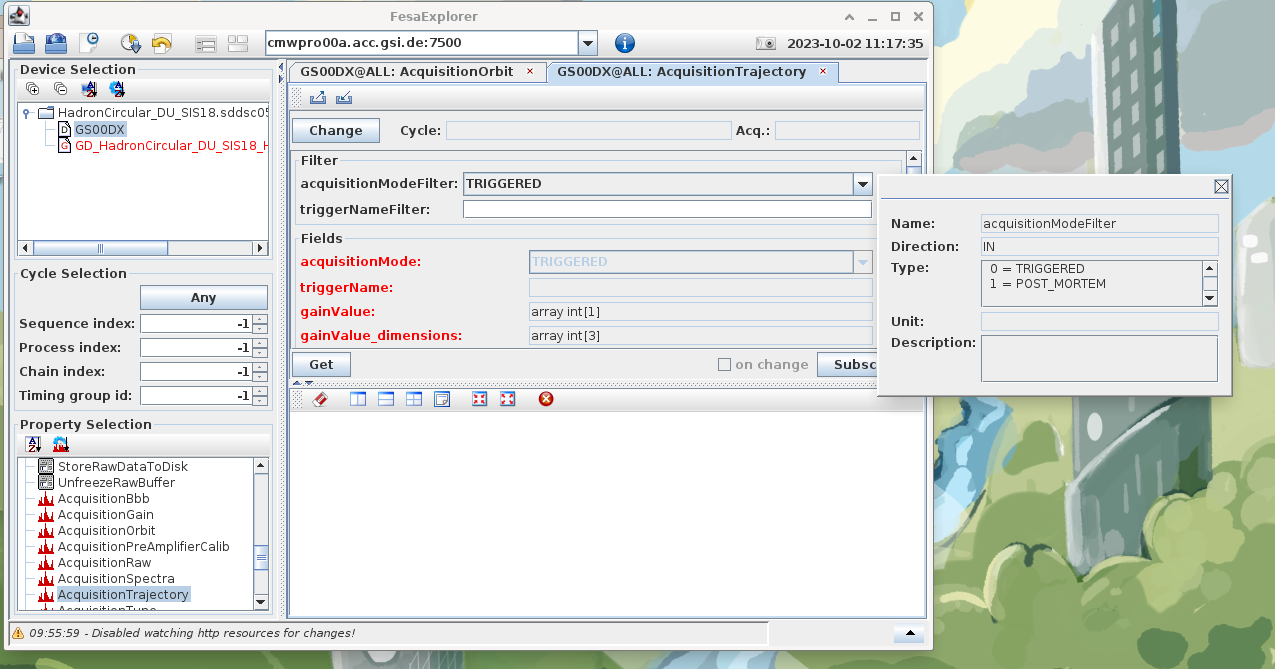
Select: Device name GS00DX, Property name: AcquisitionTrajectory and Subscription filter settings: acquisitionModeFilter: TRIGGERED, triggerNameFilter: None
subscription = client.subscribe(
    "GS00DX/AcquisitionTrajectory",
    context=[
        TimingSelector("FAIR.SELECTOR.ALL"),
        #acquisitionModeFilter: 0 = TRIGGERED, 1 = POST_MORTEM
        # triggerNameFilter: array char [32] (string), TRIGGERED mode. Leave empty for all events
        DataFilter(acquisitionModeFilter=np.int32(0), triggerNameFilter='')
    ],
)
A example script can be found https://git.gsi.de/scripting-tools/cmw-lsa-wiki/-/snippets/99
Closed Orbit
Select: Device name GS00DX, Property name: AcquisitionOrbit and Subscription filter settings: acquisitionModeFilter: FULL_SEQUENCE, decimationFrequencyFilter: FREQ_100_Hz
subscription = client.subscribe(
    "GS00DX/AcquisitionOrbit",
    context=[
        TimingSelector("FAIR.SELECTOR.ALL"),
        # acquisitionModeFilter: 0 = STREAMING, 1 = FULL_SEQUENCE, 2 = SNAPSHOT
        # decimationFrequencyFilter: 1 = FREQ_10_Hz,  2 = FREQ_25_Hz, 3 = FREQ_100_Hz, 4 = FREQ_1000_Hz
        DataFilter(acquisitionModeFilter=np.int32(1), decimationFrequencyFilter=np.int32(3)
    ],
)
A example script can be found https://git.gsi.de/scripting-tools/cmw-lsa-wiki/-/snippets/100
How to find information about the FESA filters?
Open the FESA explorer (Tab: Miscellaneous/ExpertApps) over the launcher (run launcher pro). Seclect: cmwpro00a.acc.gsi.de:7500. Search for FESA model, open device, select property, Click the question mark to the right of the filters
FESA REST Interface
Whenever the FESA Explorer does not give you enough information to find a device, you can try querying the REST Interface to the FESA DB. In Python, you can use either the requests library (simple, synchronous calls) or aiohttp (async/await calls). On the terminal, your best bet iscurl, maybe in combination with jq.
$ # Get a _long_ list of all FESA devices:
$ # (Very important: _no_ trailing `/` character!)
$ curl https://asl157.acc.gsi.de/fesa-client/v1/device | jq | less
...
$ # Get information about one device, e.g. to find its FESA class name:
$ curl https://asl157.acc.gsi.de/fesa-client/v1/device/GS01DT1FP
[
 {
   "dbId": 59584,
   "deviceName": "GS01DT1FP",
   "serverName": "FCT_Ring_DU.sddsc079",
   "accelerator": "SIS18",
   "fecName": "sddsc079",
   "className": "FCT_Ring",
   "classVersionMinor": 3,
   "classVersionMajor": 0,
   "classVersionTiny": 4,
   "acceleratorZone": "SIS18_RING",
   "timingDomain": "300",
   "state": "operational"
 }
]
Timing Selectors, Users, Sequences, Beam Processes, Beam Production Chains, Timing Group IDs
Timing selectors at GSI are defined in this meeting. Examples of valid selectors are:-
FAIR.SELECTOR.ALLselects all events. -
FAIR.SELECTOR.T=300:C=1:S=2:P=3selects only those events where all four indices have the specified value. -
FAIR.SELECTOR.T=295selects only those events where the given index is as specified; the others can have any value. -
FAIR.SELECTOR.T=295:S=ALLhas the same meaning as the previous one.
ALL and makes no
selection on it.
The names have the following meaning: -
C: beam process chain index -
T: timing group index -
S: sequence index -
P: beam process index
Sequence Indexes are generated and assigned per Particle Transfer (which corresponds to one Timing Group). For Synchrotrons and transfer lines, Beam Processes that belong to the same Beam Production Chain will have the same Sequence Index within one Particle Transfer (but not necessarily the same Sequence Index between Particle Transfers). For Storage Rings, each Beam Process will have a different Sequence Index.The following code gives an overview of all resident patterns, their selectors and their LSA contexts:
from functools import reduce
import pjlsa_gsipro
with pjlsa_gsipro.LSAClientGSI().java_api():
    from cern.lsa.client import ContextService, ServiceLocator

def print_beam_process_user_table(pattern):
    # Get selector and context name for each beam process.
    rows = [
        (bp.getUser() or "", bp.toString())
        for bp in pattern.getBeamProcesses()
    ]
    # Headers of the table.
    headers = ["USER", "BEAM PROCESS"]
    # Find the maximum width for each column of the table.
    widths = reduce(
        (lambda acc, row: tuple(map(max, acc, map(len, row)))),
        rows,
        tuple(map(len, headers)),
    )
    # Print the headers, a separator, and then each row.
    print(*(f"{h:{w}s}" for h, w in zip(headers, widths)), sep=" | ")
    print(*(w * "-" for w in widths), sep="-|-")
    for row in rows:
        print(*(f"{cell:{w}s}" for cell, w in zip(row, widths)), sep=" | ")

def main():
    context_service = ServiceLocator.getService(ContextService)
    for pattern in context_service.findResidentPatterns():
        print("Pattern:", pattern)
        print_beam_process_user_table(pattern)

if __name__ == "__main__":
    main()
The Request and Builder Patterns
Many functions in LSA follow the same basic API: A service provides a method, which accepts a request object and returns a response object. Take, for example, the following function:public
cern.lsa.domain.settings.ContextSettings
cern.lsa.client.rest.api.v1.ClientRestCommonSettingService.findContextSettings(
cern.lsa.domain.settings.ContextSettingsRequest
)
This is the "find context settings" method provided by the settings service. It accepts a context settings request and responds with the context settings.
This is the function you will typically call when you want to retrieve the settings of the machine either right now or at a point in the past.
The request and response objects are typically passive data structures, i.e. they have attributes, but no behavior. An attribute named e.g. "stand-alone context" can usually be retrieved via its getter method, getStandAloneContext().
In order to get a request object in the first place, you usually follow the builder pattern that is implemented by all request types. Each request type has a classmethod builder() that gives you a fresh builder object. The builder has one method for each attribute of the request. The method sets that particular attribute on the builder and returns the builder itself. This allows you to perform method chaining. Once you've set all attributes, you can call build() on the builder and it returns the complete request object to you.
The following example shows you how to find the settings of a particular parameter in a given context at a specified point in time:
import pjlsa_gsipro
with pjlsa_gsipro.LSAClientGSI().java_api():
    from cern.lsa.client import (
        ContextService,
        ParameterService,
        ServiceLocator,
        SettingService,
    )
    from cern.lsa.domain.settings import ContextSettingsRequest
    from java.time import ZonedDateTime

def main():
    # Retrieve the services we need.
    cs = ServiceLocator.getService(ContextService)
    ss = ServiceLocator.getService(SettingService)
    ps = ServiceLocator.getService(ParameterService)

    # Get Java objects for the information we need to supply.
    param = ps.findParameterByName("LOGICAL.GS05MQ1/K0L_S")
    ctx = cs.findPattern("SIS18_KO_HADES_200MeV")
    time = ZonedDateTime.parse("2024-03-14T13:00:00+01:00").toInstant()

    # Build the request and send it
    settings = ss.findContextSettings(
        ContextSettingsRequest.builder()
        .standAloneContext(ctx)
        .parameters([param])
        .at(time)
        .build()
    )

    # You have multiple ways to get the settings out of the response object.
    # 1. iterate over the set returned by `.getSettings()`,
    # 2. get only those settings for a particular parameter: `.getParameterSettings(param)`,
    # 3. get a dict from parameter to settings list: `.getParameterSettingsMap()`.
    for s in settings.getSettings():
        print(
            s.getBeamProcess(), ": ",
            s.getParameter(), " = ",
            s.getTargetValue().getFloat(),
            sep="",
        )

if __name__ == "__main__":
    main()
This should have the following output:
SIS18_KO_HADES_200MeV.C1.SIS18_RING.RING_RAMP.1: LOGICAL.GS05MQ1/K0L_S = 0.0
SIS18_KO_HADES_200MeV.C1.SIS18_RING.RING_INJECTION.1: LOGICAL.GS05MQ1/K0L_S = 0.0
SIS18_KO_HADES_200MeV.C1.SIS18_RING.RING_PRE_EXTRACTION.1: LOGICAL.GS05MQ1/K0L_S = 0.0
Setting Up Pjlsa on Arch Linux
The following steps are necessary to install pjlsa:- Install:
gradle - Install:
java-17-openjdk - Set Java 17 as default (for convenience, this is the same Java version as on the ACC cluster):
sudo archlinux-java set java-17-openjdk


| I | Attachment | Action | Size | Date | Who | Comment |
|---|---|---|---|---|---|---|
 png png |
fesa_explorer.png | manage | 255 K | 2023-10-02 - 11:26 | SabrinaAppel | |
| png |
pythonbridge.png | manage | 264 K | 2025-04-23 - 10:34 | SabrinaAppel |




Please login to edit this topic
Topic revision: r18 - 2025-06-17, PennyMadysa
Warning: Can't find topic BEPHY.WebLeftBarExample
 Copyright © by the contributing authors. All material on this collaboration platform is the property of the contributing authors.
 Ideas, requests, problems regarding GSI Wiki? Send feedback | Legal notice | Privacy Policy (german)